Dismissal
School dismissal softwarefor your car line.
Carline puts the car line in arrival order as parents check in. Your dismissal team works from one screen, staff still approve every release, and every step is recorded and can’t be edited later.

The 3pm problem
Where dismissal goes wrong.
At dismissal, every adult in the building is working from radios, notes and memory at the same time.
The lot fills faster than a name can be carried across it. A call goes out on the radio, gets repeated and comes back as the wrong grade. The car that has waited longest isn’t always the one being loaded.
The office phone rings through all of it. Grandma is coming instead. Practice is canceled. We are stuck behind the bus. Every one of those changes lands on one desk at the busiest minute of the day, and none of them is written down anywhere yet.
Down the hall a teacher stands with a room full of coats and backpacks, waiting to hear a name. And the record of what actually happened, if there is one, is a clipboard somebody types up on Thursday.
Nobody is doing anything wrong. The car line just isn’t written down anywhere.
What the afternoon runs on today
- A radio, and a name repeated twice.
- A phone that starts ringing at 2:55.
- A teacher holding a room, waiting on a name.
- A clipboard, typed up on Thursday.
What changes
What changes at your school.
The order is decided at the lane
Arrival order comes from the scan, not from who shouted first. The queue is the same list on every screen.
Classrooms stop waiting
The classroom board shows the call within seconds of the car arriving, so the walk to the door happens while the car is still moving.
The office phone gets quieter
Who has arrived is on a screen, and “bus today” or “Grandma is coming” arrives in the app before your cutoff. The calls that remain are the ones that actually need a person.
No paperwork to type up later
The record is written as it happens, by the people doing the thing, with no retyping and no reconstruction.
Carline sets the order of the line. Your staff still approve every release at the door, as they do today, and the app holds a child back when a custody order or an ID check says to wait.
Step by step
How it works, step by step.
There is nothing to wire or mount, and nobody has to relay names over the radio.
-
Scan the sign
Pull into the lane and scan the Carline sign from the driver’s seat, or type the code printed under it. One check-in calls the children the school has linked to that parent, in the order the cars arrived.
-
Names light up
The dismissal screen shows who is up the moment the car checks in, in the order the cars arrived. Staff start the children moving before the car reaches the curb, and that is where the time is saved.
-
The teacher sends them out
A tap on the classroom board marks the child as sent, so the door team knows who is on their way and the classroom knows who has already gone.
-
Staff release at the door
Staff match the car to the child at the door, exactly like today. Carline sets the order. Your staff always approve the release. If a child can’t come out, staff mark why (absent, not in class or not at the curb) and the car keeps its place in line. A child with a custody order on file, or picked up by an adult named for the day, waits in class until staff have checked.
Everyone works from the same list.
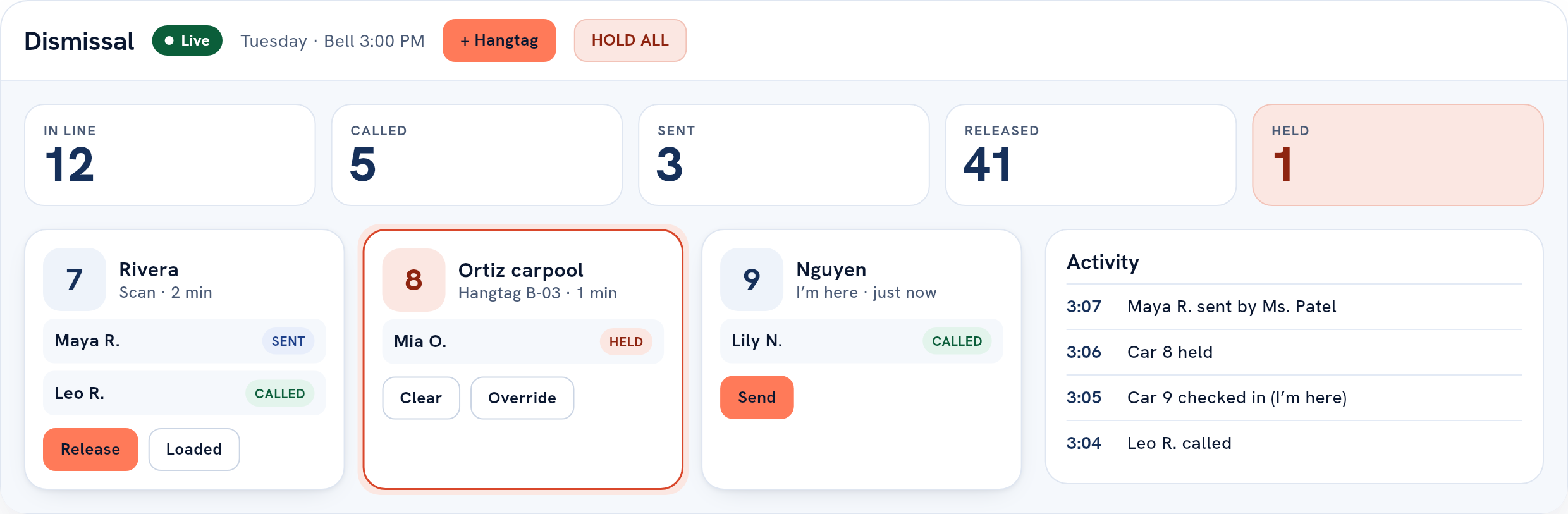
The dashboard is the queue. It shows each car’s number and pass color, which children are in it, and where each one is: called, sent, held for a check, in the car or not coming out. Staff work from the top, and the list reorders as cars arrive and leave. An admin can pause every classroom at once with HOLD ALL.
An illustration, running on invented families.
The record
A record nobody can edit.
Each step of dismissal is saved as it happens, with the name of the person who did it.
Each line carries who did it and when, and the day’s lines are numbered without gaps, so a screen that loses its connection can tell “nothing happened” from “I missed two hundred things”.
That is what makes the afternoon answerable the next morning. Who collected a child, and at what time. Whether a car ever arrived. Who marked a child not in class, and which reason they chose. The answer is a line in the day’s record rather than somebody’s memory of a Tuesday.
Reporting today is the full ordered record of one afternoon; a day-by-day summary for admins (cars, children released, the typical and the slowest wait, when the day closed and whether it was paused); and downloads of a child’s, a family’s or the whole school’s record, each one written to an access log.
What gets a line
- The day opening, and the day closing.
- A car checking in, or a check-in refused.
- A child called, sent, released, held back or canceled.
- A hold placed, cleared, refused or overridden, with the reason.
- An adult’s ID checked before a child went with them.
- A change of plan filed or withdrawn for today.
- Dismissal paused, and resumed.
- A car canceled before it reached the door.
- A retired sign scanned.
The log is not append-only by convention. A database trigger rejects any update or delete against it, so an edit is not something an administrator, an engineer or a bug can perform. Corrections are new lines. The original stays.
Setting it up
An afternoon of setup, all in the browser.
-
Tell us your bell
An admin sets your time zone, your dismissal time and how many minutes before the bell parents may check in. Nothing runs until the time zone is set, so “today” always means your local day.
-
Send your roster
Whatever your student information system exports: students with their grade and classroom, parents with their email, and which parent goes with which child. Or connect a OneRoster, Clever or ClassLink source. An admin sees exactly what an import will do before anything is saved.
-
Print your signs
Each pickup place gets a sign, such as the gym doors or the bus loop. An admin adds it, the code is created, and you print it from the browser and laminate it.
-
Invite your people
Staff and parents get an email invitation and set their own password, or sign in with an account the invitation is linked to. Nobody joins your school without an invitation.
-
Run a dry afternoon
Open the board on the classroom screen and the dashboard on a laptop, and walk one car through. That is the whole rollout.
Walk one car through it with us.
Twenty minutes on a screen share, set up against your bell time and your pickup points.